
How to Transfer a Custom Domain from Wix to Shopify: Complete Process, Timeline, and Key Precautions
Frequently Asked Questions When Moving to Shopify
Two of the most common questions we receive from those considering a migration from Wix to Shopify are:
“Can I transfer the custom domain I used on Wix?”
“How long does the transfer take?”
In this article, we break down the exact steps we followed during a Wix → Shopify custom domain transfer (which took about 11 days). We also cover important precautions and include the actual email messages received during the process.
If you're planning to transfer your domain, this guide should be very helpful.
Can a custom domain used on Wix be transferred?
Conclusion: Yes, you can transfer it.
A domain purchased and managed through Wix can be transferred to Shopify or any other registrar once you:
- Unlock the domain on Wix
- Obtain the EPP code (authorization code)
However, there is a very important point you must check before starting the transfer.
Important Pre-check Before Transferring: Pay Attention to Your Email Address
Check whether the contact email address associated with your Wix account (login email) belongs to the domain you are transferring.
Example:
If the domain you plan to transfer is example.com
→ and your Wix account email is mail@example.com, you must change it.
Reason:
When the domain’s DNS switches during the transfer, there’s a risk that your email may stop receiving messages. If that happens, you may not receive the domain transfer approval emails, which can halt the transfer.
How long does a Wix → Shopify domain transfer take?
In our experience, the transfer was completed in 11 days.
Below is a day-by-day timeline of the entire transfer process.
[Transfer Timeline] Complete Record of Wix → Shopify Domain Transfer
▶ Day 0: Transfer Request Initiated
1. Preparation on the Wix side
1-1 Unlocking the domain & starting the transfer
From Wix’s domain settings, select “Transfer Domain” and
disable the domain lock.
1-2 Obtaining the EPP code
Generate the EPP code in the Wix dashboard.
Keep this code—it will be required on Shopify.
2. Entering the transfer information in Shopify
In the Shopify admin:
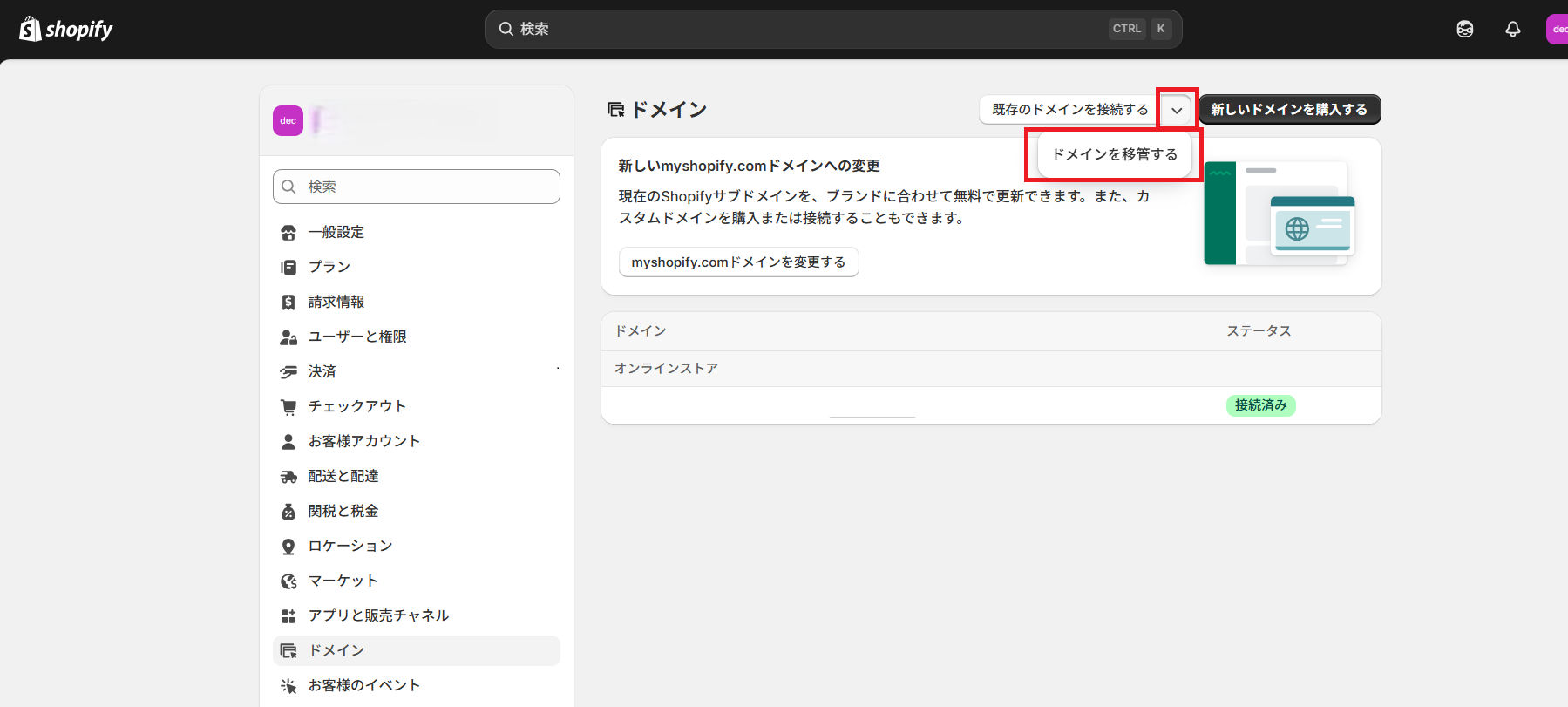
Settings > Domains > Transfer domain
Information required:
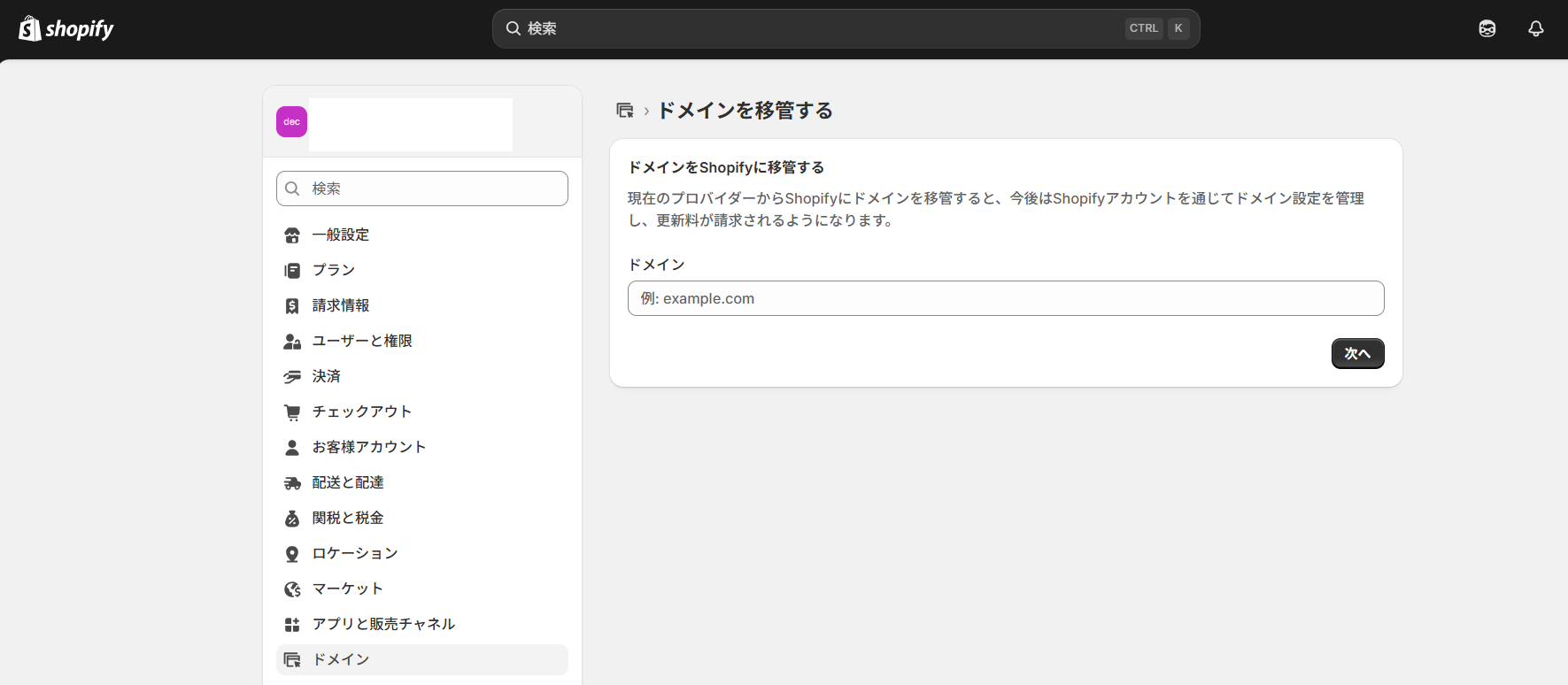
- The domain name to be transferred (without “www”)
- The EPP code obtained from Wix
Notes:
- The “Transfer domain” option is a bit hard to find.
Go to Settings > Domains > next to “Connect existing domain,” select “Transfer domain”.
- Enter the domain strictly in the format example.com (no “www”).
3. Paying the domain transfer fee
Enter your personal and billing information in Shopify.
You will be charged one year of domain registration ($16 USD~) in advance.
▶ Day 2: Email from Wix Regarding the Transfer
You will receive an email from Wix with the subject:
Transfer of domain_name
Summary of the English content:
- Wix has received a transfer request for your domain
- If you want to cancel, you must contact them by the specified date
No reply is required.
The process will continue automatically.
▶ Day 3: Pointing DNS to Shopify
Based on various recommendations, we updated DNS settings on Wix so both:
- Root domain (no www)
- www subdomain
had their A records and CNAMEs pointing to Shopify’s recommended DNS settings.
Although the domain is still transferring, doing this early helps ensure a smooth transition.
▶ Day 7: Email from Shopify (ICANN Verification)
An email arrives from Shopify / ICANN:
Summary:
- Because you recently registered, transferred, or updated contact info for your domain, you must verify your ownership
- If you do not verify within 14 days, your domain may be suspended
Click the link in the email to complete verification.
▶ Day 10: Checking with Shopify Support
Since 10 days had passed, we contacted Shopify support to confirm the transfer status—just in case.
▶ Day 11: Transfer Complete
In Shopify’s domain settings, a status such as:
“Processing / Attention required”
appears temporarily.
This simply indicates DNS is updating and the transfer is in its final stage.
Within 24 hours, the domain transfer was fully completed.
The domain is now successfully managed under Shopify.
Summary: Wix → Shopify domain transfers generally take 1–2 weeks
Our case took 11 days, but the timeframe varies depending on:
- Wix’s approval timing
- DNS propagation speed
- How quickly you respond to the ICANN verification email
If you are also migrating your email hosting, it’s a good idea to plan your DNS changes in advance to avoid downtime.
The best reference is Shopify’s official documentation below:
Shopify Guide: Domain Transfer
https://help.shopify.com/manual/domains/add-a-domain/connecting-domains/transferring-domains
Goat WebCreation: Full Support for Shopify Migration & Domain Transfers
Are you planning to launch an international site or migrate from Wix to Shopify?
- “I’m not confident about domain or DNS settings…”
- “I want to migrate my EC site to Shopify but don’t know where to start.”
Goat WebCreation provides support for:
- International English-language website development
- Shopify setup & customization
- Full Wix → Shopify migration (including domain transfer)
Even if your idea is still vague, feel free to reach out.
Tell us “what you want to achieve,” and we’ll work with you to design the best website structure based on your vision.